
𝐒𝟗 𝐏𝐥𝐮𝐬 𝐃𝐨𝐰𝐧𝐥𝐨𝐚𝐝 – 𝐍𝐞𝐰 𝐄𝐚𝐫𝐧𝐢𝐧𝐠 𝐀𝐩𝐩 𝐢𝐧 𝐏𝐚𝐤𝐢𝐬𝐭𝐚𝐧 𝐟𝐨𝐫 𝐀𝐧𝐝𝐫𝐨𝐢𝐝
S9 Plus is a real money app in Pakistan with Ludo, Cards, Mines, Rummy, and Sports. Enjoy simple games with easy withdrawal methods. Click the button below to download S9 Plus and get started.

S9 Plus APK Detail
| Feature | S9 Plus |
|---|---|
| App Name | S9 Plus |
| Platform | Android |
| Version | Current |
| APK | Available |
| Install | APK File |
| Internet | Required |
| Storage | Free Space |
| Price | Free |
𝐒𝟗 𝐏𝐥𝐮𝐬 𝐈𝐧𝐭𝐫𝐨𝐝𝐮𝐜𝐭𝐢𝐨𝐧
S9 Plus is a new-style gaming platform designed for players who enjoy casino-inspired games, card games, and other entertaining gaming options in one place. The S9 Plus Game focuses on simple navigation, multiple game categories, smooth gameplay, and an easy account system for new and returning players.

For users in Pakistan, the platform may be interesting because it brings different gaming options together instead of requiring players to use separate applications for different games. Depending on the current version and availability, users may find games such as Dragon Tiger, Roulette, Zoo Roulette, and other casino-style options.
The S9 Plus App is mainly designed for mobile users, while players looking for a larger display can explore compatible PC options. Android users may also find an S9 Plus APK installation option when the platform distributes its Android package directly.
Cash gaming always carries some financial risk. Your balance, bonus, or game result can change, and no game can promise you steady income. Always follow the rules that apply in your area, and only play with money you’re okay losing.
This guide walks you through everything you need to know about S9 Plus, its features, top games, bonus offers, how to sign up and log in, recovering your password, adding and withdrawing money, installing on Android, using it on iPhone, playing on PC, keeping your account safe, and playing responsibly.
𝐖𝐡𝐚𝐭 𝐈𝐬 𝐒𝟗 𝐏𝐥𝐮𝐬?

S9 Plus is a gaming platform that brings several casino-style and entertainment games together under one account. Instead of focusing on just one type of game, the S9 Plus Game offers different categories so users can pick an option based on their interests.
The platform is built around a simple interface. New users can usually create an account, log in, explore the available games, check their wallet or balance area, and manage account-related options from the main interface.
The exact games, features, payment methods, bonuses, and supported devices can change when a new version comes out. Because of this, users should always check the latest information on the official S9 Plus source before installing an application or making a transaction.
𝐒𝟗 𝐏𝐥𝐮𝐬 𝐊𝐞𝐲 𝐅𝐞𝐚𝐭𝐮𝐫𝐞𝐬
S9 Plus offers simple features, different game options, and an easy-to-use interface for players.

𝐌𝐮𝐥𝐭𝐢𝐩𝐥𝐞 𝐆𝐚𝐦𝐞𝐬
The platform brings different gaming options together in one place. Users can explore games such as Dragon Tiger, Roulette, and Zoo Roulette. Available games may change with updates.

𝐒𝐢𝐦𝐩𝐥𝐞 𝐈𝐧𝐭𝐞𝐫𝐟𝐚𝐜𝐞
The clean layout makes it easier to find different sections and game options. New users can explore the platform without dealing with complicated menus. Navigation can also vary slightly between versions.

𝐌𝐨𝐛𝐢𝐥𝐞 𝐀𝐜𝐜𝐞𝐬𝐬
The mobile-focused design makes it convenient for users who prefer playing on their smartphones. Android users may have an APK installation option when officially supported. Device compatibility depends on the current version.

𝐄𝐚𝐬𝐲 𝐑𝐞𝐠𝐢𝐬𝐭𝐫𝐚𝐭𝐢𝐨𝐧
New users can create an account through the available registration option. The process generally requires basic account information and verification. Always use your own details when registering.
𝐖𝐚𝐥𝐥𝐞𝐭 𝐅𝐞𝐚𝐭𝐮𝐫𝐞𝐬
The wallet section can help users view their balance and manage available transactions. Deposit and withdrawal options depend on the current platform and supported methods. Check all details before confirming a transaction.

𝐑𝐞𝐰𝐚𝐫𝐝𝐬
Promotional rewards may be available for eligible users from time to time. These can include different offers, bonuses, or promotional campaigns. Always check the conditions before accepting an offer.

𝐏𝐂 𝐒𝐮𝐩𝐩𝐨𝐫𝐭
Users who prefer a larger screen may be able to access the platform through a compatible PC setup. An Android emulator may be needed if there is no dedicated Windows version. Performance depends on the computer setup.

𝐒𝐞𝐜𝐮𝐫𝐞 𝐀𝐜𝐜𝐨𝐮𝐧𝐭
Basic security practices can help users protect their accounts and personal information. A strong password and private verification codes are important for account safety. Avoid sharing login details with anyone.
𝐒𝟗 𝐏𝐥𝐮𝐬 𝐁𝐨𝐧𝐮𝐬 𝐚𝐧𝐝 𝐑𝐞𝐰𝐚𝐫𝐝𝐬
S9 Plus may provide different promotional bonuses and rewards for eligible users. Available offers can change over time and may have specific terms.
𝐖𝐞𝐥𝐜𝐨𝐦𝐞 𝐁𝐨𝐧𝐮𝐬
New users may receive a promotional bonus after registration. The exact offer depends on the current promotion and its requirements.
𝐃𝐚𝐢𝐥𝐲 𝐑𝐞𝐰𝐚𝐫𝐝
Some users may find daily rewards for regular platform activity. Availability and eligibility can vary with the current version.
𝐑𝐞𝐟𝐞𝐫𝐫𝐚𝐥 𝐁𝐨𝐧𝐮𝐬
Referral promotions may provide rewards when eligible new users join through a referral. Check the current conditions before participating.
𝐃𝐞𝐩𝐨𝐬𝐢𝐭 𝐕𝐨𝐮𝐜𝐡𝐞𝐫
Certain promotions may offer extra benefits when users complete an eligible deposit. Minimum amounts and other conditions may apply.
𝐬𝐩𝐞𝐜𝐢𝐚𝐥 𝐄𝐯𝐞𝐧𝐭 𝐑𝐞𝐰𝐚𝐫𝐝𝐬
Special campaigns may introduce temporary rewards during selected events or occasions. These offers can have a limited availability period.
𝐋𝐨𝐠𝐢𝐧 𝐑𝐞𝐰𝐚𝐫𝐝
A promotional login reward may be available for eligible accounts. Users should check the rewards section to see whether a current offer is active.
𝐏𝐫𝐨𝐦𝐨𝐭𝐢𝐨𝐧𝐚𝐥 𝐁𝐨𝐧𝐮𝐬
S9 Plus may introduce other promotional bonuses from time to time. Always read the terms, expiry date, and eligibility rules before using any offer.
𝐒𝟗 𝐏𝐥𝐮𝐬 𝐏𝐨𝐩𝐮𝐥𝐚𝐫 𝐆𝐚𝐦𝐞𝐬
S9 Plus App offers different gaming options for users who enjoy card and casino-style entertainment. The available game list can change with updates, so users should check the current game lobby.
𝐃𝐫𝐚𝐠𝐨𝐧 𝐓𝐢𝐠𝐞𝐫
Dragon Tiger is a simple card game played around two sides, Dragon and Tiger. Players select an available option according to the table rules. Each round has an uncertain outcome.
𝐑𝐨𝐮𝐥𝐞𝐭𝐭𝐞
Roulette uses a spinning wheel with different numbered and colored sections. Players can choose from the betting options provided by the game. Results are based on chance.
𝐙𝐨𝐨 𝐑𝐨𝐮𝐥𝐞𝐭𝐭𝐞
Zoo Roulette adds animal-themed symbols to the traditional roulette-style format. Its visual design gives the game a different presentation. The available options depend on the current version.
𝐓𝐞𝐞𝐧 𝐏𝐚𝐭𝐭𝐢
Teen Patti is a popular three-card game enjoyed by many card-game players. The game uses different hand combinations and table rules. Users should understand the rules before starting.
𝐁𝐚𝐜𝐜𝐚𝐫𝐚𝐭
Baccarat is a card-based game where players follow the available table options. The game has simple basic rules but can include different betting choices. Results are not guaranteed.
𝐀𝐧𝐝𝐚𝐫 𝐁𝐚𝐡𝐚𝐫
Andar Bahar is a traditional card game with a straightforward format. Players select an available side according to the game’s rules. The outcome of each round is uncertain.
𝐁𝐥𝐚𝐜𝐤𝐣𝐚𝐜𝐤
Blackjack is a card game where players aim to follow the table’s target rules without exceeding the allowed total. Different versions may have slightly different rules. Always check the instructions before playing.
𝐒𝐢𝐜 𝐁𝐨
Sic Bo is a dice-based game that uses three dice and different betting options. Players can select from the choices shown on the game table. Each result is determined by the dice outcome.
Bilkul, heading ka keyword naturally intro mein aa jayega aur baqi content same rahega:
𝐇𝐨𝐰 𝐒𝟗 𝐏𝐥𝐮𝐬 𝐆𝐚𝐦𝐞 𝐖𝐨𝐫𝐤𝐬
Understanding how the S9 Plus Game works is simple, even for new users. A user creates an account, signs in, explores the available games, and selects a game from the lobby.
If the platform supports wallet-based play, users may need to add funds before participating in cash-based games. The available payment methods and minimum amounts should be checked directly in the account.
A typical user journey may look like this:
𝐇𝐨𝐰 𝐭𝐨 𝐆𝐞𝐭 𝐒𝐭𝐚𝐫𝐭𝐞𝐝 𝐰𝐢𝐭𝐡 𝐒𝟗 𝐏𝐥𝐮𝐬
Getting started with S9 Plus is simple for new users. First, make sure you are using the correct and supported version of the platform. After opening it, you can create an account and explore the available sections.
Start slowly, understand how each section works, and only use features that you are comfortable with. Game results can be uncertain, so it is also important to set a personal spending limit and play responsibly.
𝐒𝟗 𝐏𝐥𝐮𝐬 𝐃𝐨𝐰𝐧𝐥𝐨𝐚𝐝 𝐟𝐨𝐫 𝐀𝐧𝐝𝐫𝐨𝐢𝐝
Android users may be able to install S9 Plus through an APK package when an official Android APK is provided.
An APK is an Android application package. It allows an application to be installed outside the standard app-store process. However, APK installation also creates additional security considerations because users should make sure the file comes from a trusted and verified source.
𝐇𝐨𝐰 𝐭𝐨 𝐃𝐨𝐰𝐧𝐥𝐨𝐚𝐝 𝐒𝟗 𝐏𝐥𝐮𝐬 𝐀𝐏𝐊 𝐟𝐨𝐫 𝐀𝐧𝐝𝐫𝐨𝐢𝐝
S9 Plus APK for Android is easy to download when the supported APK is available from a trusted source. Android users can follow a few simple steps to download and install the app. Before starting, make sure your phone has enough storage and that you are using a current, compatible version.
𝐒𝟗 𝐏𝐥𝐮𝐬 𝐀𝐧𝐝𝐫𝐨𝐢𝐝 𝐑𝐞𝐪𝐮𝐢𝐫𝐞𝐦𝐞𝐧𝐭𝐬
𝐀𝐧𝐝𝐫𝐨𝐢𝐝 𝐃𝐨𝐰𝐧𝐥𝐨𝐚𝐝 𝐒𝐚𝐟𝐞𝐭𝐲
Only download the S9 Plus APK from a source you can verify. Do not use random APK websites, unknown links, cracked packages, or files that ask for permissions unrelated to the app’s basic functions.
It is also a good idea to keep Android security features enabled and review the permissions requested during installation. If anything looks unusual, stop the installation and check the source before continuing.
𝐇𝐨𝐰 𝐭𝐨 𝐃𝐨𝐰𝐧𝐥𝐨𝐚𝐝 𝐒𝟗 𝐏𝐥𝐮𝐬 𝐟𝐨𝐫 𝐢𝐎𝐒
S9 Plus for iOS is easy to access when an official iPhone or iPad version is available. Check the App Store or verified source for the latest supported option.
𝐇𝐨𝐰 𝐭𝐨 𝐃𝐨𝐰𝐧𝐥𝐨𝐚𝐝 𝐒𝟗 𝐏𝐥𝐮𝐬 𝐟𝐨𝐫 𝐏𝐂
S9 Plus for PC can be used on a Windows computer through a compatible Android emulator if a dedicated PC version is not available. This lets users access the mobile app on a larger screen with keyboard and mouse support.
𝐁𝐚𝐬𝐢𝐜 𝐏𝐂 𝐑𝐞𝐪𝐮𝐢𝐫𝐞𝐦𝐞𝐧𝐭𝐬
For a smoother experience, users should have:
𝐇𝐨𝐰 𝐭𝐨 𝐑𝐞𝐠𝐢𝐬𝐭𝐞𝐫 𝐨𝐧 𝐒𝟗 𝐏𝐥𝐮𝐬
Registering on S9 Plus is a simple first step for new users who want to access the platform. The registration fields and process may vary depending on the current version.
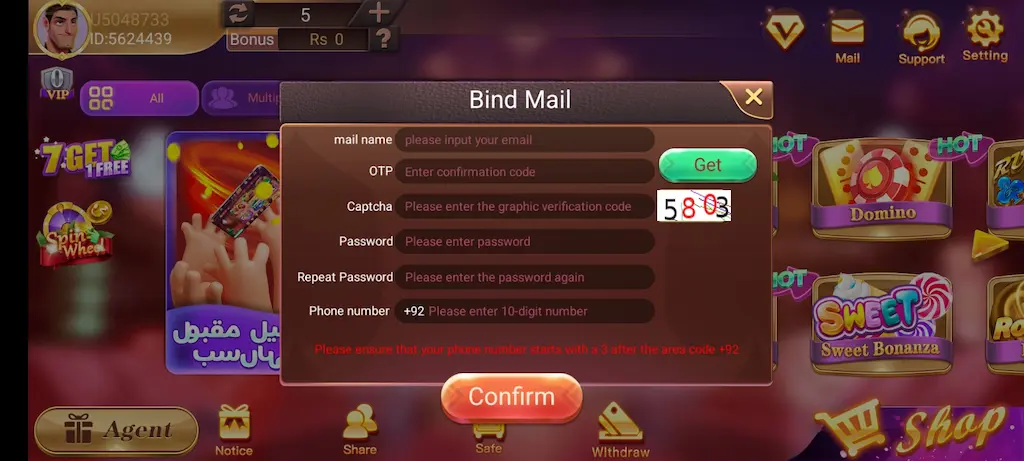
Use your own information and avoid creating accounts with temporary details that you may lose access to later.
𝐇𝐨𝐰 𝐭𝐨 𝐋𝐨𝐠𝐢𝐧 𝐭𝐨 𝐒𝟗 𝐏𝐥𝐮𝐬
After registration, users can access their account through the Login option. The exact login fields may vary depending on the current version.
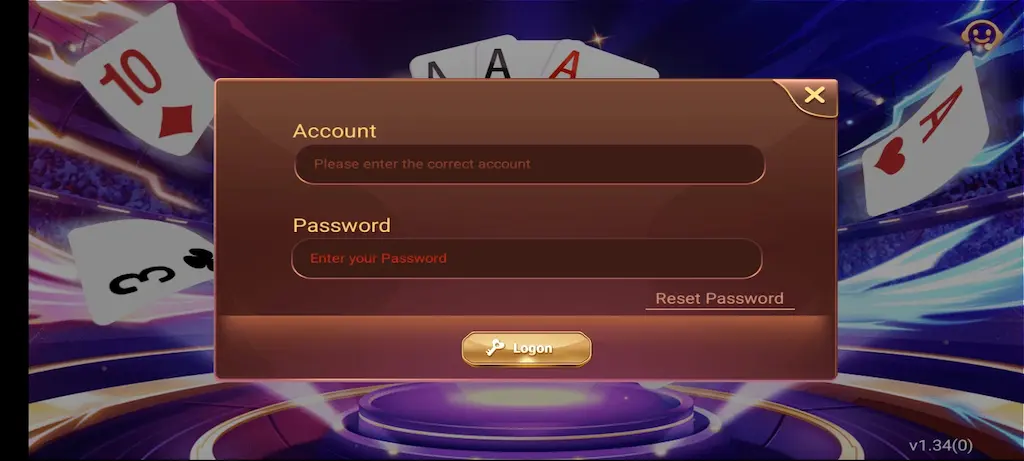
Keep your login details private and avoid sharing your password or verification codes with anyone.
𝐅𝐨𝐫𝐠𝐨𝐭 𝐏𝐚𝐬𝐬𝐰𝐨𝐫𝐝 𝐨𝐧 𝐒𝟗 𝐏𝐥𝐮𝐬
Forgetting a password does not necessarily mean that an account is permanently lost. If the current S9 Plus version provides a password recovery feature, users can normally reset their password from the login screen.
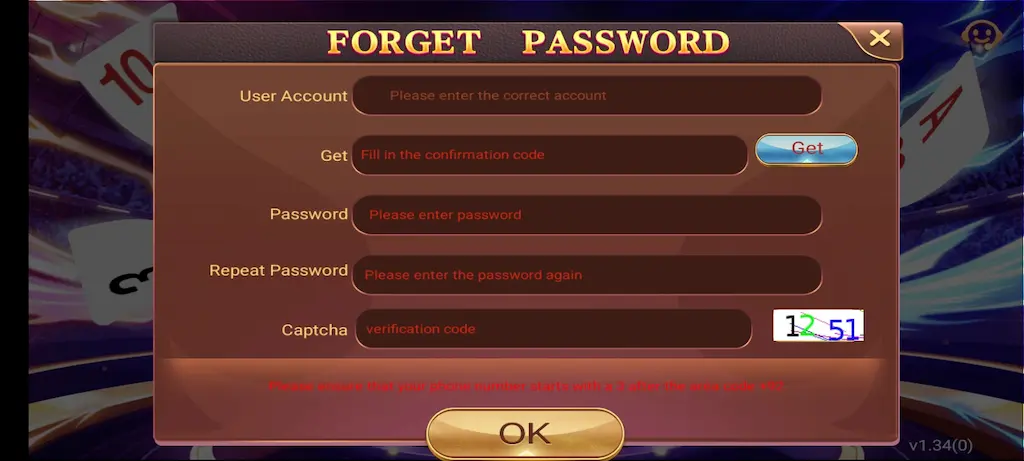
Never give your verification code or password to another person claiming to recover your account.
𝐇𝐨𝐰 𝐭𝐨 𝐃𝐞𝐩𝐨𝐬𝐢𝐭 𝐨𝐧 𝐒𝟗 𝐏𝐥𝐮𝐬
The S9 Plus deposit process is simple when wallet and payment features are available. Users can choose a supported payment method, enter the required amount, and confirm the transaction.

𝐇𝐨𝐰 𝐭𝐨 𝐖𝐢𝐭𝐡𝐝𝐫𝐚𝐰 𝐌𝐨𝐧𝐞𝐲 𝐟𝐫𝐨𝐦 𝐒𝟗 𝐏𝐥𝐮𝐬
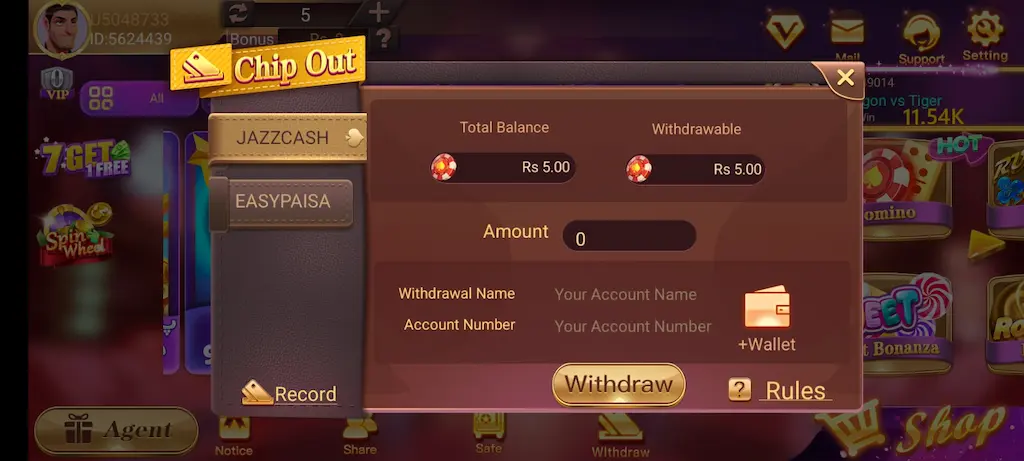
The S9 Plus withdrawal process allows eligible users to request a balance transfer through the payment options available in their account. Depending on the current version and location, options such as JazzCash or Easypaisa may be available.
𝐒𝟗 𝐏𝐥𝐮𝐬 𝐖𝐢𝐭𝐡𝐝𝐫𝐚𝐰𝐚𝐥 𝐒𝐭𝐞𝐩𝐬
𝐖𝐚𝐥𝐥𝐞𝐭 𝐎𝐩𝐭𝐢𝐨𝐧𝐬
JazzCash and Easypaisa may be available as wallet options for eligible users. Available methods, minimum amounts, fees, and processing times can vary, so always check the withdrawal page before confirming a request.
Keep your transaction details until the withdrawal is completed. Never share your wallet PIN, password, or verification code with another person.
𝐒𝟗 𝐏𝐥𝐮𝐬 𝐏𝐚𝐲𝐦𝐞𝐧𝐭 𝐌𝐞𝐭𝐡𝐨𝐝𝐬
S9 Plus payment options may vary depending on the user’s location, account, and current version. Before making a deposit or withdrawal, check the wallet section to see which methods are currently available.
𝐖𝐡𝐚𝐭 𝐭𝐨 𝐂𝐡𝐞𝐜𝐤
JazzCash and Easypaisa may be available for eligible users, depending on the current payment options. Always confirm the recipient details before completing a transaction.
Never send money to a personal account or unknown number provided by someone claiming to represent S9 Plus.
𝐒𝟗 𝐏𝐥𝐮𝐬 𝐃𝐞𝐩𝐨𝐬𝐢𝐭 𝐚𝐧𝐝 𝐖𝐢𝐭𝐡𝐝𝐫𝐚𝐰𝐚𝐥 𝐋𝐢𝐦𝐢𝐭𝐬
Deposit and withdrawal limits can be different for each account or payment method. The current wallet section should be checked before making a transaction
𝐃𝐞𝐩𝐨𝐬𝐢𝐭 𝐋𝐢𝐦𝐢𝐭
The minimum and maximum deposit amount may depend on the selected payment method. Always enter an amount within the limit shown on your account.
𝐖𝐢𝐭𝐡𝐝𝐫𝐚𝐰𝐚𝐥 𝐋𝐢𝐦𝐢𝐭
Withdrawal limits can also vary by account and payment option. Check the available limit before submitting a withdrawal request to avoid unnecessary delays.
𝐓𝐫𝐚𝐧𝐬𝐚𝐜𝐭𝐢𝐨𝐧 𝐓𝐢𝐦𝐞
Some transactions may appear quickly, while others can take longer to process. Processing time can depend on the payment service, account verification, and platform status.
𝐒𝟗 𝐏𝐥𝐮𝐬 𝐓𝐫𝐚𝐧𝐬𝐚𝐜𝐭𝐢𝐨𝐧 𝐇𝐢𝐬𝐭𝐨𝐫𝐲
The transaction history section can help users keep track of deposits, withdrawals, and other wallet activity. Checking this section is useful when a payment is still pending or the balance does not update immediately.
𝐒𝟗 𝐏𝐥𝐮𝐬 𝐆𝐚𝐦𝐞 𝐑𝐮𝐥𝐞𝐬
Every game can have its own rules, table options, and result system. New users should read the instructions shown inside a game before making any selection.
Game results are not guaranteed, and understanding the rules does not remove the possibility of losing money. It is better to learn the basic format first and avoid making decisions based only on previous results.
𝐊𝐧𝐨𝐰 𝐭𝐡𝐞 𝐑𝐮𝐥𝐞𝐬
Read the game instructions before starting. Pay attention to available options, round timing, limits, and result information.
𝐂𝐡𝐞𝐜𝐤 𝐓𝐡𝐞 𝐋𝐢𝐦𝐢𝐭𝐬
Different tables or game modes may use different limits. Check the amount shown before confirming any action.
𝐔𝐧𝐝𝐞𝐫𝐬𝐭𝐚𝐧𝐝 𝐑𝐞𝐬𝐮𝐥𝐭𝐬
Each round has its own outcome. A previous result does not guarantee what will happen in the next round.
𝐇𝐨𝐰 𝐭𝐨 𝐂𝐡𝐨𝐨𝐬𝐞 𝐚 𝐆𝐚𝐦𝐞
Choosing a game should begin with understanding its rules and format. Different games may have different controls, limits, and levels of complexity.
𝐒𝟗 𝐏𝐥𝐮𝐬 𝐆𝐚𝐦𝐞 𝐓𝐢𝐩𝐬 𝐟𝐨𝐫 𝐍𝐞𝐰 𝐏𝐥𝐚𝐲𝐞𝐫𝐬
There is no method that can guarantee a winning result in chance-based games. New users can still improve their experience by learning the rules and managing their play carefully.
𝐈𝐬 𝐒𝟗 𝐏𝐥𝐮𝐬 𝐒𝐚𝐟𝐞?
Safety depends on where the application comes from, what permissions it requests, and how users protect their accounts. Downloading from an unverified source can create additional security risks.
Users should check the source carefully, keep their device updated, and avoid sharing passwords or verification codes. No platform should be treated as completely risk-free.
𝐈𝐬 𝐒𝟗 𝐏𝐥𝐮𝐬 𝐑𝐞𝐚𝐥 𝐨𝐫 𝐅𝐚𝐤𝐞?
The safest way to check an S9 Plus service is to verify its current website, application source, account details, and available support channels. Users should not rely only on advertisements, social media posts, or claims made by unknown individuals.
Before downloading or making a payment, confirm that you are using the intended platform and review the information available through its current official channels.
𝐒𝟗 𝐏𝐥𝐮𝐬 𝐀𝐏𝐊 𝐒𝐚𝐟𝐞𝐭𝐲
APK files should only be installed when their source can be verified. Unknown APK files can potentially contain unwanted software or request permissions that are not necessary.
𝐒𝟗 𝐏𝐥𝐮𝐬 𝐀𝐩𝐩 𝐏𝐞𝐫𝐦𝐢𝐬𝐬𝐢𝐨𝐧𝐬
When installing an application, Android may show the permissions requested by the app. Users should review these permissions rather than approving everything without checking.
If an application requests access that appears unrelated to its normal functions, users should investigate the reason before continuing.
𝐒𝟗 𝐏𝐥𝐮𝐬 𝐏𝐫𝐢𝐯𝐚𝐜𝐲 𝐆𝐮𝐢𝐝𝐞
Protecting personal information is important when using any online platform. Use a unique password and avoid sharing account information through public messages or social media.
Also review the privacy information available with the current application or website. Understand what information is requested and how account data is handled before continuing.
𝐇𝐨𝐰 𝐭𝐨 𝐊𝐞𝐞𝐩 𝐘𝐨𝐮𝐫 𝐒𝟗 𝐏𝐥𝐮𝐬 𝐀𝐜𝐜𝐨𝐮𝐧𝐭 𝐒𝐚𝐟𝐞
Account security starts with simple habits. A strong password, private verification codes, and careful payment checks can reduce common account problems.
𝐒𝟗 𝐏𝐥𝐮𝐬 𝐍𝐨𝐭 𝐎𝐩𝐞𝐧𝐢𝐧𝐠
If the app does not open, the problem may come from an outdated version, insufficient storage, internet issues, or device compatibility.
𝐒𝟗 𝐏𝐥𝐮𝐬 𝐋𝐨𝐠𝐢𝐧 𝐏𝐫𝐨𝐛𝐥𝐞𝐦
Login issues can happen because of an incorrect password, outdated app, connection problem, or account verification requirement.
First, check your login details carefully. If the problem continues, use the available password recovery or verified support option rather than giving your account information to an unknown person.
𝐒𝟗 𝐏𝐥𝐮𝐬 𝐀𝐏𝐊 𝐈𝐧𝐬𝐭𝐚𝐥𝐥𝐚𝐭𝐢𝐨𝐧 𝐄𝐫𝐫𝐨𝐫
An APK may fail to install if it is incomplete, incompatible with the Android version, or blocked by device security settings.
Check that the file has downloaded completely and that your device supports the application. Avoid repeatedly installing files from unknown sources.
𝐒𝟗 𝐏𝐥𝐮𝐬 𝐃𝐞𝐩𝐨𝐬𝐢𝐭 𝐏𝐫𝐨𝐛𝐥𝐞𝐦
If a deposit does not appear in the wallet, first check the transaction status and payment details. Do not make repeated payments before confirming what happened to the original transaction.
Keep your payment reference or receipt. If the transaction remains unresolved, use the platform’s verified support channel.
𝐒𝟗 𝐏𝐥𝐮𝐬 𝐖𝐢𝐭𝐡𝐝𝐫𝐚𝐰𝐚𝐥 𝐏𝐫𝐨𝐛𝐥𝐞𝐦
A withdrawal may remain pending because of verification, payment processing, account information, or platform-side review.
Check that the wallet details are correct and review the withdrawal status. Keep the transaction reference available if you need to contact support.
𝐒𝟗 𝐏𝐥𝐮𝐬 𝐏𝐚𝐲𝐦𝐞𝐧𝐭 𝐏𝐞𝐧𝐝𝐢𝐧𝐠
A pending payment does not always mean that the transaction has failed. The payment may still be under processing by the selected method.
Avoid sending another payment until the status of the first transaction is clear. Check the wallet history and keep the transaction reference for support.
𝐇𝐨𝐰 𝐭𝐨 𝐔𝐩𝐝𝐚𝐭𝐞 𝐒𝟗 𝐏𝐥𝐮𝐬
Keeping the application updated can help maintain compatibility and access to the latest available features.
Do not use modified update packages or files from unknown websites.
𝐒𝟗 𝐏𝐥𝐮𝐬 𝐂𝐮𝐬𝐭𝐨𝐦𝐞𝐫 𝐒𝐮𝐩𝐩𝐨𝐫𝐭
Customer support can be useful when users face account, payment, installation, or login problems. The available support options may depend on the current version and service.
Before contacting support, collect the basic information about your issue, such as the transaction reference, error message, or account-related problem.
𝐇𝐨𝐰 𝐭𝐨 𝐂𝐨𝐧𝐭𝐚𝐜𝐭 𝐒𝟗 𝐏𝐥𝐮𝐬 𝐒𝐮𝐩𝐩𝐨𝐫𝐭
Use only support channels listed through a verified S9 Plus source. You can also check the Contact Us page for the correct support details and available contact options. Avoid contacting random numbers, social media accounts, or individuals claiming to be representatives.
Never send your password, wallet PIN, or private verification code to support staff or anyone else. Keep your account and payment details private when asking for help.
𝐒𝟗 𝐏𝐥𝐮𝐬 𝐇𝐞𝐥𝐩 𝐆𝐮𝐢𝐝𝐞 𝐟𝐨𝐫 𝐁𝐞𝐠𝐢𝐧𝐧𝐞𝐫𝐬
New users do not need to learn every feature at once. Start with the basic account functions and become familiar with the game lobby, wallet, settings, and support options.
𝐒𝟗 𝐏𝐥𝐮𝐬 𝐀𝐜𝐜𝐨𝐮𝐧𝐭 𝐕𝐞𝐫𝐢𝐟𝐢𝐜𝐚𝐭𝐢𝐨𝐧
Some services may request account verification before allowing certain features or transactions. The exact information required depends on the current platform rules.
Only provide information through a verified account page or official support channel. Do not send personal documents to unknown individuals through social media or messaging apps.
𝐒𝟗 𝐏𝐥𝐮𝐬 𝐑𝐞𝐬𝐩𝐨𝐧𝐬𝐢𝐛𝐥𝐞 𝐆𝐚𝐦𝐢𝐧𝐠 𝐆𝐮𝐢𝐝𝐞
Chance-based gaming can involve financial loss, so responsible use is important. Treat gaming as entertainment rather than a source of guaranteed income.
𝐒𝟗 𝐏𝐥𝐮𝐬 𝐒𝐩𝐞𝐧𝐝𝐢𝐧𝐠 𝐚𝐧𝐝 𝐁𝐮𝐝𝐠𝐞𝐭 𝐓𝐢𝐩𝐬
A simple budget can help users keep control of their spending. Decide in advance how much you can afford to lose without affecting your normal expenses.
Do not increase your budget simply because you experienced a loss. Keeping a clear limit can make it easier to stop when your planned amount has been used.
𝐒𝟗 𝐏𝐥𝐮𝐬 𝐋𝐞𝐠𝐚𝐥 𝐚𝐧𝐝 𝐋𝐨𝐜𝐚𝐥 𝐂𝐨𝐧𝐬𝐢𝐝𝐞𝐫𝐚𝐭𝐢𝐨𝐧𝐬
Rules for online gaming and cash-based services can vary by country and region. Users should check the laws and restrictions that apply to their own location before using such features.
Do not assume that an application is legally available simply because it can be downloaded. Local rules, age requirements, payment restrictions, and other conditions may apply.
𝐒𝟗 𝐏𝐥𝐮𝐬 𝐏𝐫𝐢𝐯𝐚𝐜𝐲 𝐚𝐧𝐝 𝐃𝐚𝐭𝐚 𝐒𝐚𝐟𝐞𝐭𝐲
Personal information should be handled carefully on any online gaming platform. Use secure login details and avoid entering account information on pages that you cannot verify.
It is also useful to review the platform’s current privacy information and understand what permissions or account details are requested.
𝐒𝟗 𝐏𝐥𝐮𝐬 𝐯𝐬 𝐓𝐫𝐚𝐝𝐢𝐭𝐢𝐨𝐧𝐚𝐥 𝐂𝐚𝐬𝐢𝐧𝐨 𝐆𝐚𝐦𝐞𝐬
S9 Plus and traditional casino-style gaming can provide different ways to access similar types of entertainment. A digital platform can place multiple game options inside one interface, while traditional gaming normally takes place at a physical location.
| Feature | S9 Plus | Traditional |
| Access | Online | Physical |
| Device | Mobile | Venue |
| Games | Platform | Location |
| Account | Digital | Venue |
| Payment | Digital | Cash |
| Location | Inte |
𝐒𝟗 𝐏𝐥𝐮𝐬 𝐀𝐩𝐩 𝐯𝐬 𝐒𝟗 𝐏𝐥𝐮𝐬 𝐀𝐏𝐊
The app and APK can refer to different installation methods rather than completely different services. An app-store version is normally installed through the relevant store, while an APK is an Android package installed directly.
APK users should pay extra attention to the download source and file authenticity. Never install a modified package simply because it claims to provide extra features.
𝐒𝟗 𝐏𝐥𝐮𝐬 𝐀𝐧𝐝𝐫𝐨𝐢𝐝 𝐯𝐬 𝐏𝐂
Android provides a direct mobile experience when a supported version is available. PC access can offer a larger display but may require an emulator if there is no dedicated Windows application.
| Feature | Android | PC |
| Screen | Small | Large |
| Install | APK | Emulator |
| Control | Touch | Keyboard |
| Portability | High | Low |
| Performance | Mobile | Desktop |
𝐒𝟗 𝐏𝐥𝐮𝐬 𝐏𝐫𝐨𝐬 𝐚𝐧𝐝 𝐓𝐡𝐢𝐧𝐠𝐬 𝐭𝐨 𝐂𝐨𝐧𝐬𝐢𝐝𝐞𝐫
𝐏𝐫𝐨𝐬
𝐓𝐡𝐢𝐧𝐠𝐬 𝐭𝐨 𝐂𝐨𝐧𝐬𝐢𝐝𝐞𝐫
𝐅𝐢𝐧𝐚𝐥 𝐓𝐡𝐨𝐮𝐠𝐡𝐭𝐬 𝐀𝐛𝐨𝐮𝐭 𝐒𝟗 𝐏𝐥𝐮𝐬
S9 Plus brings several gaming, account, and wallet-related features into one digital platform. New users can start by understanding the available games, registration process, payment options, and account settings.
The most important part is to use a verified version, protect personal information, check transaction details carefully, and understand that cash-based gaming involves financial risk. Features, payment methods, bonuses, and device support can change, so checking the latest information before downloading or using the platform is always important.